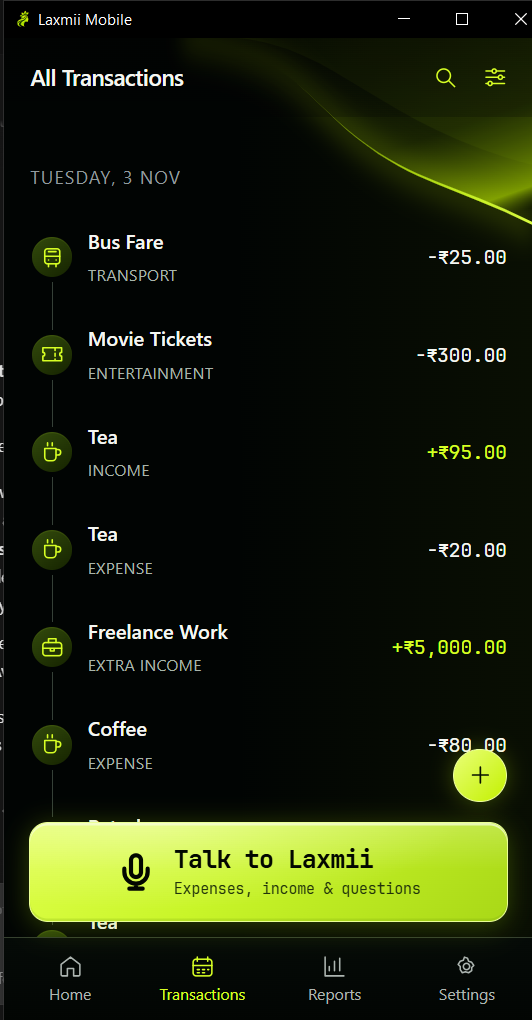
A clear record of your day.
Browse expenses and income together. Search, filter, or update an entry whenever you need.
From your morning chai to payday. Add expenses and income, update your records, and ask about your spending—just by talking.
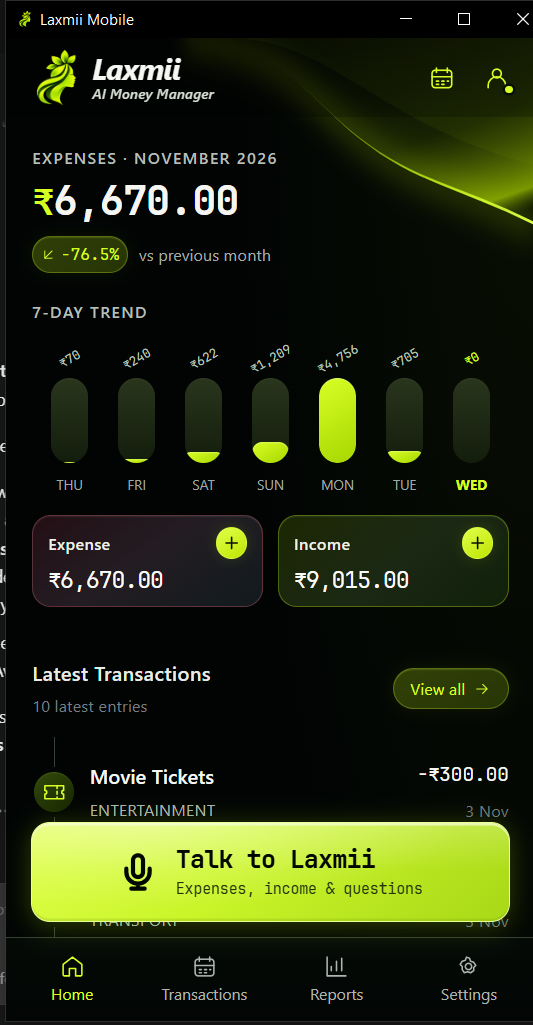
“Spent fifty on chai.”
Laxmii takes care of the entry.Actual app screen · Demo records · Android launch coming soon
Two expenses in one sentence? A salary payment? A quick question about last month? Just say what you need.
Say the amount and what it was for, in your own words.
Laxmii understands your request and works with your saved records.
A short spoken reply. Clear records you can check, edit or correct.
“I spent ₹500 on groceries and ₹200 on petrol.”
 LaxmiiReady when you are
One sentence. Two entries. See how it works.
A visual demonstration. No recording, AI calls or real entries.
Speak when it’s convenient. Type when you prefer. See exactly where your money went.
Browse expenses and income together. Search, filter, or update an entry whenever you need.
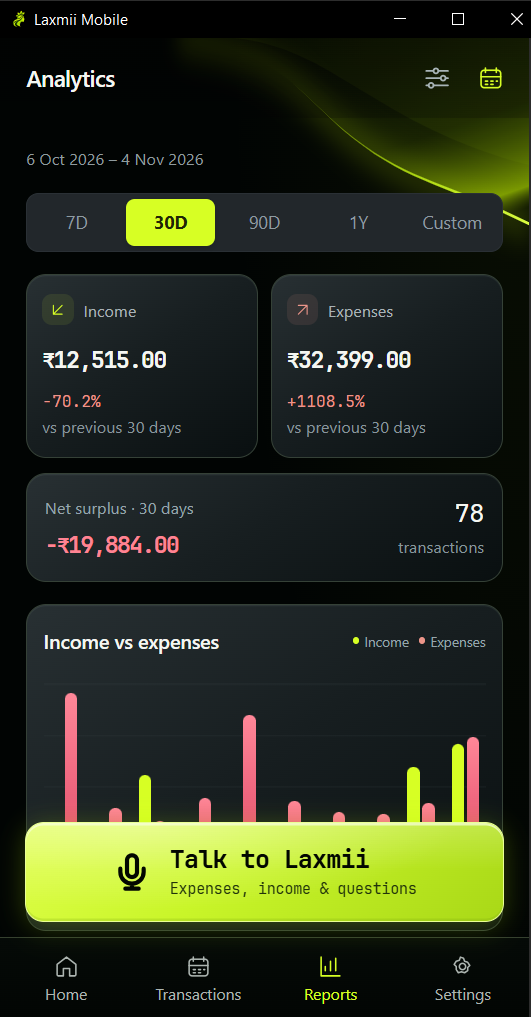
Understand your spending with totals, comparisons and reports calculated from your own records.
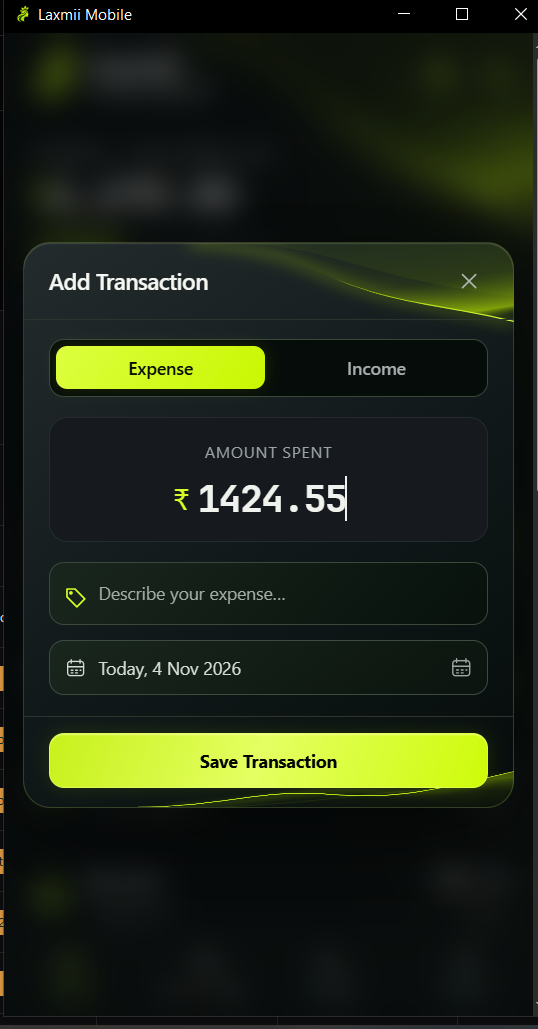
Add an amount, describe it with reusable labels and choose a date. You stay in control.
Actual app screens with demonstration records. Amounts shown are examples.
Your daily expenses and income, brought together in one calm, easy-to-use space.
Use simple spending and earning labels to find an entry days or months later. Keep the longer story in notes.
Explore saved spending, income and past months. Reports calculate totals from your records, not guesses.
Set monthly and label budgets, reuse repeat entries, and make corrections whenever you need. Manual tools stay free.
Manual tracking works offline. Your financial records stay on your device, with export and local backup tools included.
Voice needs an internet connection and sends audio and relevant information to our processing services. Signing in alone does not back up your records. Optional encrypted cloud backup is planned for Pro.
Read our privacy policyNo account needed for manual tracking.
Sign in when you want to meet your assistant.
Your everyday money tracker.
Everything you need to start.
Your personal AI money assistant.
Less typing, more convenience.
Simple, clear launch terms. Pro will automatically renew monthly unless cancelled through Google Play. Monthly requests reset each billing cycle; unused monthly requests do not roll over. Optional purchased top-ups will never expire. Necessary confirmations, corrections and failed requests won’t use extra paid requests. Manual tracking stays free.
Yes. Manual expense and income tracking, reports, labels, budgets, repeat transactions, export and local backup/restore are free. You don’t need an account for manual tracking. The planned voice trial gives each eligible account 10 successful requests, with no automatic paid conversion.
One completed instruction and its response count as one request, even if it adds several transactions. Necessary clarification, confirmation, correction of that instruction and failed attempts won’t consume an additional paid request. A genuinely new instruction counts as another request. Trial and paid request accounting are not activated yet.
Laxmii supports English, Hindi, Hinglish and Bengali. Speak naturally, tap again to send, and check the recorded result. Like any AI assistant, Laxmii can make mistakes; you can ask for a correction or edit manually.
No. Account sign-in alone does not upload or synchronize your financial ledger. Keep a local backup. Optional encrypted cloud backup is planned for Pro and is not currently available.
Without a usable backup, your records may be lost when you uninstall, clear app storage or lose your phone. Save a Laxmii backup outside the app and restore it after reinstalling. Excel exports are for reading and do not restore the app.
Under the planned terms, benefits continue until the paid period ends and new cloud-backup uploads then stop. A planned 90-day recovery window will let you restore or download an existing backup, with notice before deletion. Your local records and free tools remain available. Cloud backup and subscriptions are not live yet.
No. Laxmii works with the records you enter or ask it to create. It does not read your bank account, Gmail or SMS, and it cannot transfer money. Your reports describe recorded activity, not a guaranteed bank balance.
Contact TK Digital at tamalkchandra@gmail.com using your account email. Account deletion is separate from resetting local data and cancelling a Google Play subscription. See the account deletion page for the current process.
Android launch coming soon · Manual tracking always free